
Free 12-Month Family Budget Planner Template
Organize your family finances using a free family budget planner, by Alex Bejanishvili | Updated:Get Your Family Finances Under Control with a 12-Month Planner
This spreadsheet has been designed to help you PLAN and TRACK your personal and family finances over an entire year. By focusing on the core principle of Estimated versus Actual spending, this macro-free template gives you the control you need to successfully manage your budget.
This spreadsheet helps you compare your annual budget to your actual expenditures. It is intended to be used as an annual planning and review tool, providing a detailed 12-month roadmap for your financial health.
As a preliminary caution, you should be comfortable using a spreadsheet and understand that they are somewhat error-prone. Even if the spreadsheet is completely free of errors at the time you download it, there is no guarantee that you won't accidentally introduce errors as you edit it. With that said, download and enjoy!
Family Budget Planner
for Excel® 2003+, OpenOffice & Google Docs
File: XLS
File: XLSX
File: OTS
File: SHEET
1.1.1
Microsoft Excel® 2003 or Higher (PC & Mac)
Not Used
Not Required
Alex Bejanishvili of Spreadsheet123.com
User License Agreement
Contact Us
How to Use the 12-Month Family Budget Planner
This planner works by dividing your year into four quarterly sheets and one central Income sheet. It's a structured system designed for clear, long-term financial foresight.
Step 1: Set Your Annual Plan and Starting Balance
You begin on the Income sheet, where you establish your financial baseline and your annual plan:

Budget Planner - Income
- Starting Balance: You record the current balances for all your accounts - including Cash, Checking, and Credit Cards (entered as a negative balance) to calculate your Total Balance. This is used to set the Balance Carried Forward amount on your first quarterly sheet.
- Estimated Income: Record your Estimated Income for all 12 months. This allows you to plan ahead for seasonal or variable income throughout the year.
Step 2: Tracking Estimated vs. Actual Spending
The quarterly sheets (Jan-Mar, Apr-June, etc.) are where the monthly tracking takes place. This is where you compare your planned spending to your reality.
- Entering Data: To use this template, just fill in numbers that are highlighted with a light-blue background (the Estimated and Actual columns).
- Variance Logic: The Difference column calculates the variance. Negative numbers are bad; they show you have overspent. The spreadsheet uses accounting format where negative numbers are in parentheses like (115.00). Conditional formatting is also used to make the negative numbers red - red means bad in this case - to help it stand out as a warning.
- Running Balance: The spreadsheet includes a Balance Carried Forward line item on the quarterly sheets. This automatically links your monthly and quarterly totals, allowing your balance to dynamically carry over and update throughout the year.
Step 3: Analyzing Your Financial Goals and Performance
The template provides two dedicated reports that allow you to ANALYZE your annual performance.
- Spending Total Analysis: The dedicated Spending Total sheet summarizes your estimated and actual spending for all categories. Crucially, it calculates the % of TOTAL spending for each category. This helps you quickly see what percentage of your total budget is allocated to Housing, Transportation, etc.

Budget Planner - Spending - Savings Goal Tracker: The Savings Goal sheet lets you set specific goals (SG) for long-term items like Retirement and Kids College. It monitors your contributions (TS) and calculates your performance against your goal, providing feedback on your progress.
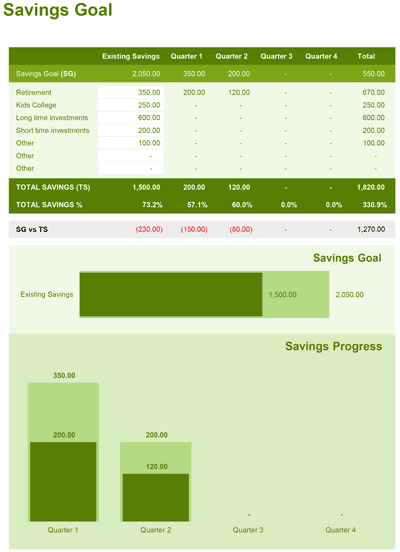
Budget Planner - Savings Goal
Important Template Cautions and Limitations
Customizing Budget Categories Safely
The calculations for the totals are based on the categories listed. You need to be careful when adding or removing categories to avoid messing up the formulas.
What you need to watch out for: If you assign a transaction to a category that is not included in the main report worksheets, the expense won't show up in your reports and you'll think you have more money than you really do. We've added conditional formatting to highlight categories not included in the main list to help prevent these types of mistakes.
No Transaction History or Bank Linking
This spreadsheet is strictly a budget planner and does not include a transaction history ledger or a checkbook register. There is also no online connectivity and no ability to import transactions from your bank or other financial institution.


